April 4, 2024, had started off so well. A hot coffee in hand, VS Code humming with activity, and smooth electronic music in my ears—all the ingredients for a perfect day that surely couldn’t foreshadow the coming disaster.
Today, I’d like to tell you how a seemingly quiet day became a defining moment in my DevOps career!
Incident
The Context
At the time, I was working in a team tasked with providing a global API Gateway on AWS, featuring several endpoints managed by different teams. Specifically, setting up this API Gateway was the initial phase of the project. It included a DNS record pointing to the API, the API Gateway itself, and a Cognito Authorizer configured with several clients.
Once this API was ready, external teams could deploy their own endpoints onto it. To facilitate this, a CI/CD pipeline was in place, using CloudFormation to attach the endpoints directly to the existing API.
I’m keeping it as simple as possible here, but if you’re interested in the technical nitty-gritty, feel free to reach out!
On my end, besides being responsible for the global API infrastructure, I occasionally worked on or bootstrapped certain services.
The Beginning of the Drama
If you’ve ever worked with CloudFormation, you might be familiar with the dreaded UPDATE_ROLLBACK_FAILED status. This happens when you try to update a CloudFormation stack, but it encounters an error. It then tries to roll back, but if that rollback fails too, your stack gets stuck in UPDATE_ROLLBACK_FAILED.
This state is particularly annoying because you cannot trigger any new deployments until you’ve resolved the underlying issue.
That is exactly what happened on that fateful April 4, 2024. One of our services got stuck in this state, and I started investigating the “why” and the “how.”
After a few minutes, I noticed the problem stemmed from the API resource itself. Without overthinking it, and in an effort to unblock the situation quickly, I headed straight to the AWS Console, specifically to the API Gateway service. I found the resource in question and rushed to delete it.
At that exact moment, something very strange happened. An unexpected behavior that made my blood run cold. Instead of staying on the same page, AWS redirected me to the main API Gateway dashboard—the page that lists your available APIs. It now displayed a count of 0.
I realized then that I hadn’t deleted a specific resource within the API, but the entire API Gateway itself.
Anatomy of a Failure
I never thought I’d make such a rookie mistake. And I imagine as you read this, you’re thinking the same thing.
Because to get it that wrong, you really have to try!
Let me reconstruct the crime scene for you. Here is what I saw when I decided to delete a resource from the API Gateway.
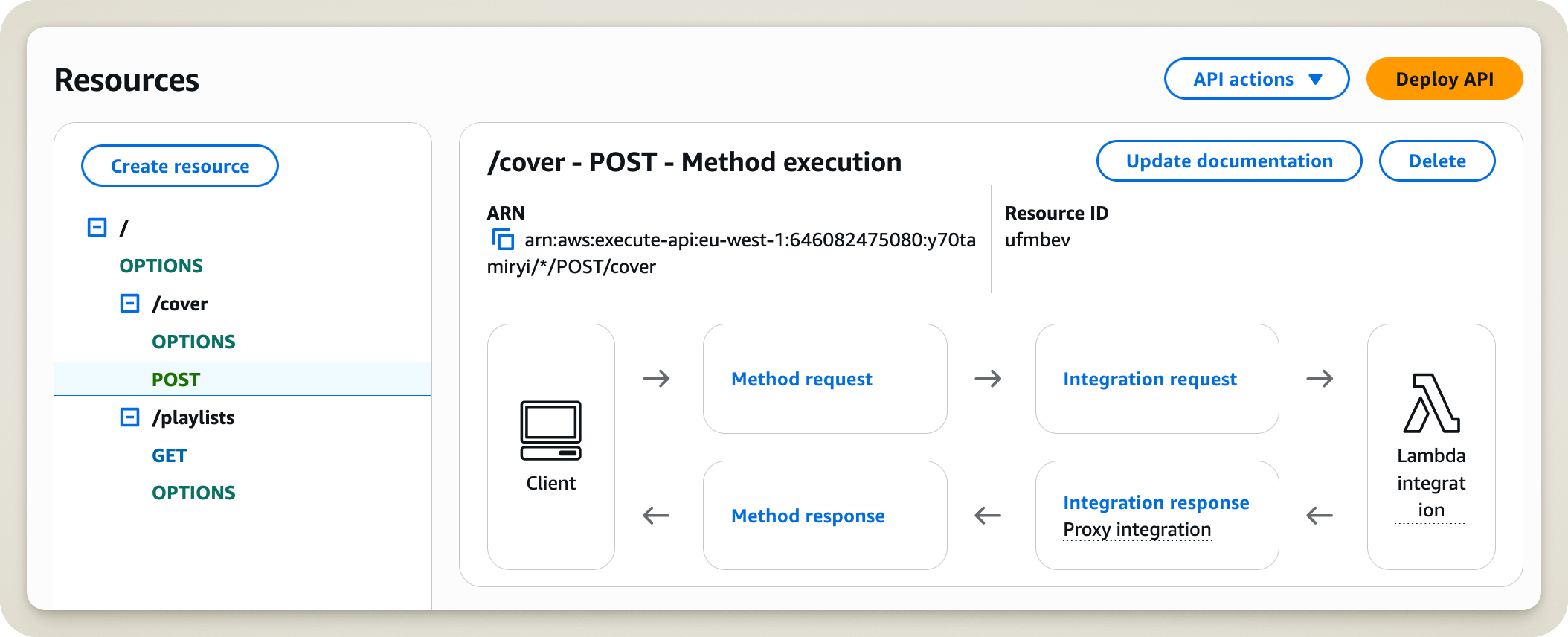
Any resemblance to an actual situation is entirely coincidental.
In my shoes, which button would you have clicked? Easy! The Delete button right next to the resource!
As for me (and I still don’t know what possessed me), I chose to click the API actions button. After all, I did want to perform an “action”!
And what happens when you click that button?
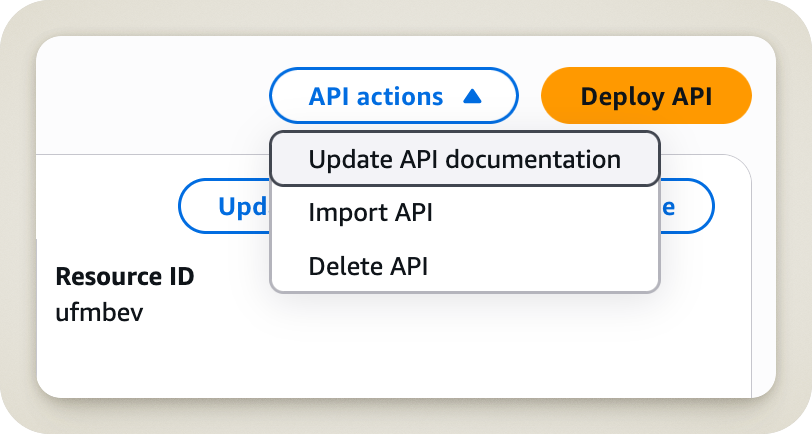
Yikes! Right away, you can see it’s not what we want at all. But do you think that stopped me? Not a chance! I came here to delete something, and when I saw the word Delete, I stopped thinking. I should have kept reading, because then I would have seen the word API right next to it.
Fortunately, our friends at AWS thought of everything! When you click Delete API, they still ask if you are absolutely sure. A nice dialog box pops up, showing the name of the API and asking you to type the word confirm to validate the operation.
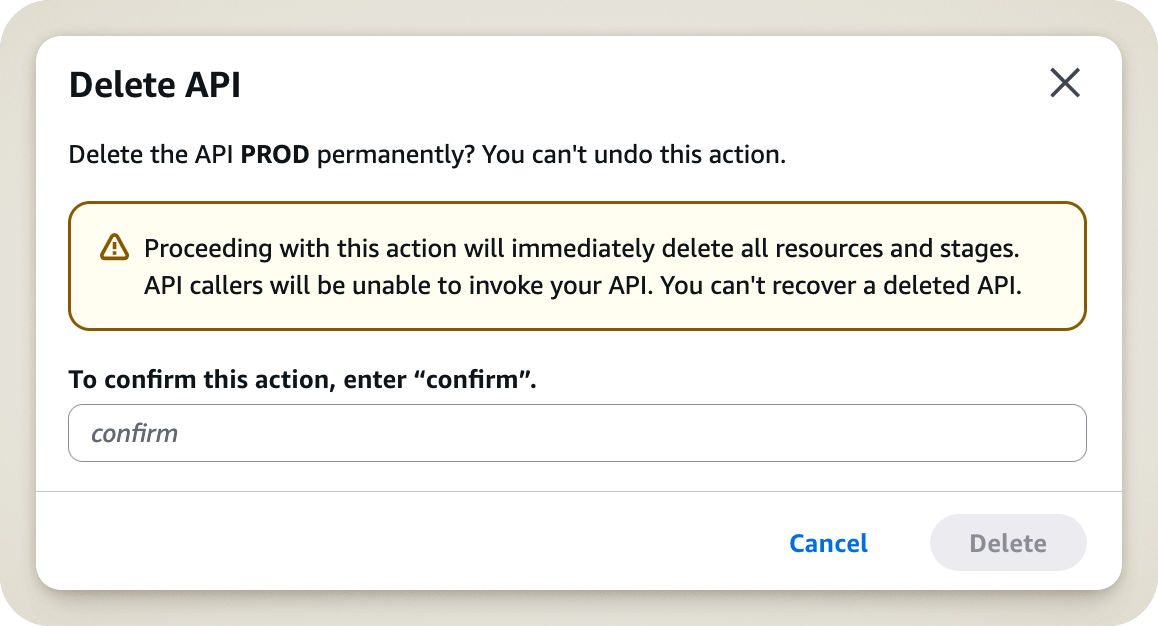
That’s all well and good, but the AWS engineers underestimated my impatience. In that moment, the confirmation request wasn’t a warning; it was an obstacle to my goal. In a heartbeat, I typed confirm and hit enter.
So, here is the last thing I saw before finally realizing the gravity of my mistake:
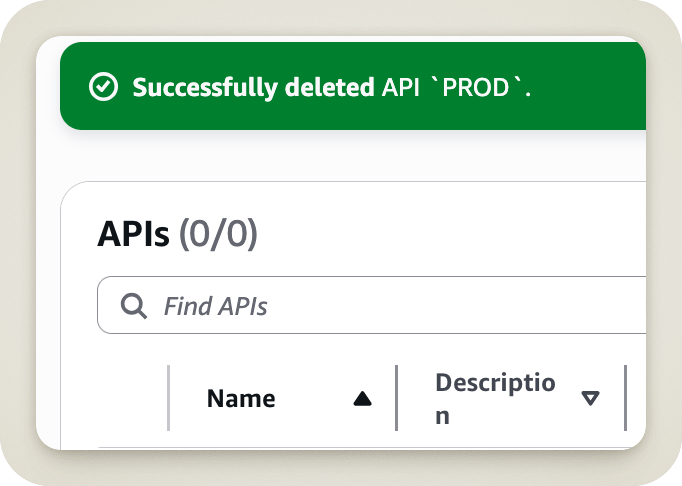
A vision of pure horror.
I wanted to walk you through this process to make one thing clear: you can put all the safeguards in the world in place, but you can’t protect a system against an impatient individual, because they won’t stop to read the warnings.
So, the next time you have to perform an “innocuous” action, take the time to read and ensure you are actually on the right path.
That being said, let’s move on to the crucial stage: resolving the incident!
Resolution
The Click
Back to the moment of impact. After realizing what had happened, I had a sudden jolt—a moment of clarity (without the aid of any white powder, I promise). I knew what I had to do: resolve the incident, but more importantly, document every single action I took.
A few weeks prior, I had looked into the 2017 GitLab incident, which took the service down for hours and resulted in data loss for some users. That’s how I discovered the concept of a Post-Mortem and why they are so vital in these situations. But I’ll save that for the next section.
In the meantime, if you’re interested in these topics, I highly recommend Kevin Fang’s YouTube channel where he, in his own words, “reads postmortems and makes low-quality videos about them.”
Rollback, Impact, and Communication
My first thought was that there might be a way to trigger a rollback directly within AWS to minimize the impact on users. If I had actually read the warning message earlier, I would have known that was impossible (but if I had read it, I wouldn’t have been in this mess anyway).
With no “undo” button in sight, I accepted that I was facing a major incident with a global impact. I first set out to map out the full extent of the damage. In my case, not only was the API down (thanks, Captain Obvious), but no new deployments could be made until the API was back online.
Finally, I made sure to notify the internal team. This kept them in the loop and let them know I was actively working on a fix.
Analysis and Troubleshooting
It was time to roll up my sleeves and find a way to redeploy the API Gateway.
First, I went to the CloudFormation service, remembering that this API was originally deployed through it. I tried updating the stack, hoping it would bring my dear API back like magic.
Obviously, it wasn’t going to be that simple. Updating the stack was impossible because the manual deletion had put the stack into a “hybrid” state that it couldn’t reconcile.
Since updating was out of the question, the logical next step was to delete the stack and redeploy it from scratch. That’s when the real trouble started. This CloudFormation stack produced several Outputs. Two of these were required by “child” stacks that had deployed their endpoints on the API. Consequently, CloudFormation blocked me from deleting the stack because it would break all the others.
After brainstorming alternatives, this heavy interdependence led me to a tough decision: I had to delete all the “child” stacks in CloudFormation—a total of 81 stacks.
To make matters worse, these child stacks didn’t have identifiable tags that would have allowed us to automate the cleanup. Fortunately, most of them used a recognizable name prefix, which allowed me to clear out the bulk of them manually.
Did I mention interdependencies? Because we’re not done! Some stacks had deployed S3 buckets. And guess what? CloudFormation won’t delete a stack if the S3 bucket isn’t empty. Naturally, 14 stacks got stuck in DELETE_FAILED. Luckily, the fix is straightforward: back up each bucket, empty it, and retry the stack deletion.
Deploying the API: Light at the End of the Tunnel?
Having finally cleared the web of interdependencies, it was time to delete the original API Gateway stack and redeploy it.
The deletion went smoothly (thank God), but—naturally—the creation did not.
First, the stack itself. A YML file existed in a GitHub repo, but it hadn’t been updated in ages. I knew I was better off using the stack definition stored within CloudFormation (and yes, I had saved a copy—I’m not that crazy).
This stack didn’t just deploy the API Gateway; it handled several AWS resources, including Lambdas. These Lambdas were still running on Python 3.7, a version that AWS no longer allows for creating new Lambdas. Fortunately, a quick upgrade to Python 3.12 was enough to satisfy the AWS gods.
And, to my surprise, the stack finally deployed without a hitch!
But to keep a long story short, there was still work to do. Several critical resources for the API were missing from the CloudFormation stack. These resources had been created manually in AWS over time, ignoring all Infrastructure as Code best practices (cries in Terraform). To restore service as quickly as possible (we’re DevOps, after all!), I recreated these resources manually once more.
Finally, several key components had the ARN of the old API hardcoded. This required a bit of “digital archaeology” to find every spot where a manual update to the new API was needed.
Ultimately, after several hours of troubleshooting, the API was back up and running, and developers could resume their deployments.
The incident began on April 4, 2024, at 3:24 PM and was resolved on April 5, 2024, at 8:46 AM.
Post-Mortem and Lessons Learned
Throughout the incident, I took intensive notes on every action taken. Having heard of the Post-Mortem principle, I knew this incident was the perfect candidate.
If you’re unfamiliar with the concept, a Post-Mortem is a document that retraces the steps of an incident, its impact, and its root cause. But most importantly—and most interestingly—it includes a Lessons Learned section. If you take this part seriously, it will be your best ally in building a more robust architecture.
In this section, you note three key points: what went well, what went wrong, and where you got lucky. And above all, be honest! Even if some points seem silly or make you look incompetent (and I’m saying this as the guy who manually deleted an API, so take it with a grain of salt), the goal isn’t to point fingers (the “blameless culture”). It’s about understanding the flaws in the system so we can fix them.
“The cost of failure is education.” — Devin Carraway (Source)
This might still feel a bit abstract, so let me share my lessons learned from this incident.
What went well
Two things went well during this incident.
First, the resolution was handled by a team member who knew the architecture inside out. This allowed for a quick understanding of what needed to be restored to get the service back online.
Second, there was excellent communication throughout. When the problem occurred, there was no attempt to hide it. Frequent updates were shared to report on progress. This is crucial—not only does it provide visibility, but communication often leads to helpful tips (like a colleague pointing you toward documentation you didn’t know existed).
What went wrong
This is the part that hurts. As I mentioned, you have to swallow your pride and highlight everything that could have been handled better.
For this incident, four things went wrong.
To start, the API infrastructure wasn’t consolidated in a single file or folder; it was scattered across multiple GitHub repos. This made it very difficult to get a bird’s-eye view of everything required for the API to function.
Next, there was a major issue with drift. This refers to the differences between your actual infrastructure and how it’s defined in your code. Ideally, no manual changes should ever occur, and everything should go through your IaC files. Had this been the case, a simple redeployment would have restored the service instantly.
Another issue was the heavy interdependence between resources. Many relied on CloudFormation stack outputs. Removing the parent stack essentially crippled the ability to manage the rest of the infrastructure.
Finally, identifying resources tied to our infrastructure was difficult. Our stack deployed resources without any associated tags, making it a scavenger hunt to find every piece of the puzzle.
Where we got lucky
This might sound positive, but it isn’t! This category covers things that went well only because of luck. Realize that at any moment, these could have been in the “What went wrong” column. Be glad this time, but don’t let your guard down!
In this case, we got lucky in three ways.
First, the incident was identified immediately (that’s the one perk of making a massive blunder yourself). But it could have been much worse! If the API had been deleted via an automated script, we had no monitoring in place to alert us.
Second, the person who deleted the API had deep knowledge of the project (yes, I’m talking about myself—I have to give myself some credit). This allowed for an immediate transition into resolution mode, but it could have been someone else who was totally lost.
Finally, this was our “Dev” API. The Production API was perfectly fine (a detail I intentionally saved for the end—you know, for the storytelling). So while the impact was minimal, the same incident could have happened in Prod with the same recovery nightmares. And that would have been much more expensive.
Preparing for the Future
Now that you’ve listed the problems encountered, as a good DevOps engineer, you must learn from them. Note everything that can be improved, but above all, set a plan! Otherwise, these are just empty words.
“A goal without a plan is just a wish.” — Antoine de Saint-Exupéry
In my case, the three key takeaways were:
- Consolidation of Infrastructure as Code: Everything must be deployable in the blink of an eye. This is a project I would complete in the following months.
- Improved Monitoring and Alerting: If this ever happens again, we need to be alerted immediately so we can react fast.
- Clearer Documentation: Any team member should be able to handle such an incident, and that starts with reliable, understandable docs.
All these lessons were tracked as GitHub issues, and I made sure to knock them out over the following months.
Conclusion
As you’ve seen, accidents happen. The key is to make sure they benefit you and your organization. Use them as an opportunity to learn and patch vulnerabilities that were previously undetected (some companies even purposely create chaos for this very reason).
Thanks for reading to the end! I’ll leave you here—I’ve got some other infrastructures to delete!